Skip to content
繁體中文

Self-hosted medical imaging

Your imaging platform, on your own server.

PACSinfra is a self-hosted medical imaging platform built on Orthanc and OHIF. Upload DICOM studies, review them, and write reports, all on your own server, with patient data that never leaves your control.

The demo is a limited preview: each demo company is deleted after 24 hours and holds up to 10 studies (500 MB). Some features, such as the DICOM node and worklist, are not included.

Security

Built on two guarantees

Tenant isolation, tested.

Each organisation sees only its own studies, verified by an automated isolation test suite. The image server is never exposed: every image passes through an API that checks permissions and records an audit entry for each request.

How it works →

De-identification before storage.

Patient identifiers are removed from DICOM metadata, including free-text fields and nested sequences, before anything reaches the image archive. Clinics can keep real identities in a separate application database. Research teams can run on pseudonyms only.

Limitation: De-identification covers DICOM metadata, not text burned into image pixels.

How it works →

What's included

Everything you need to store, review and report

  • Projects and permissions

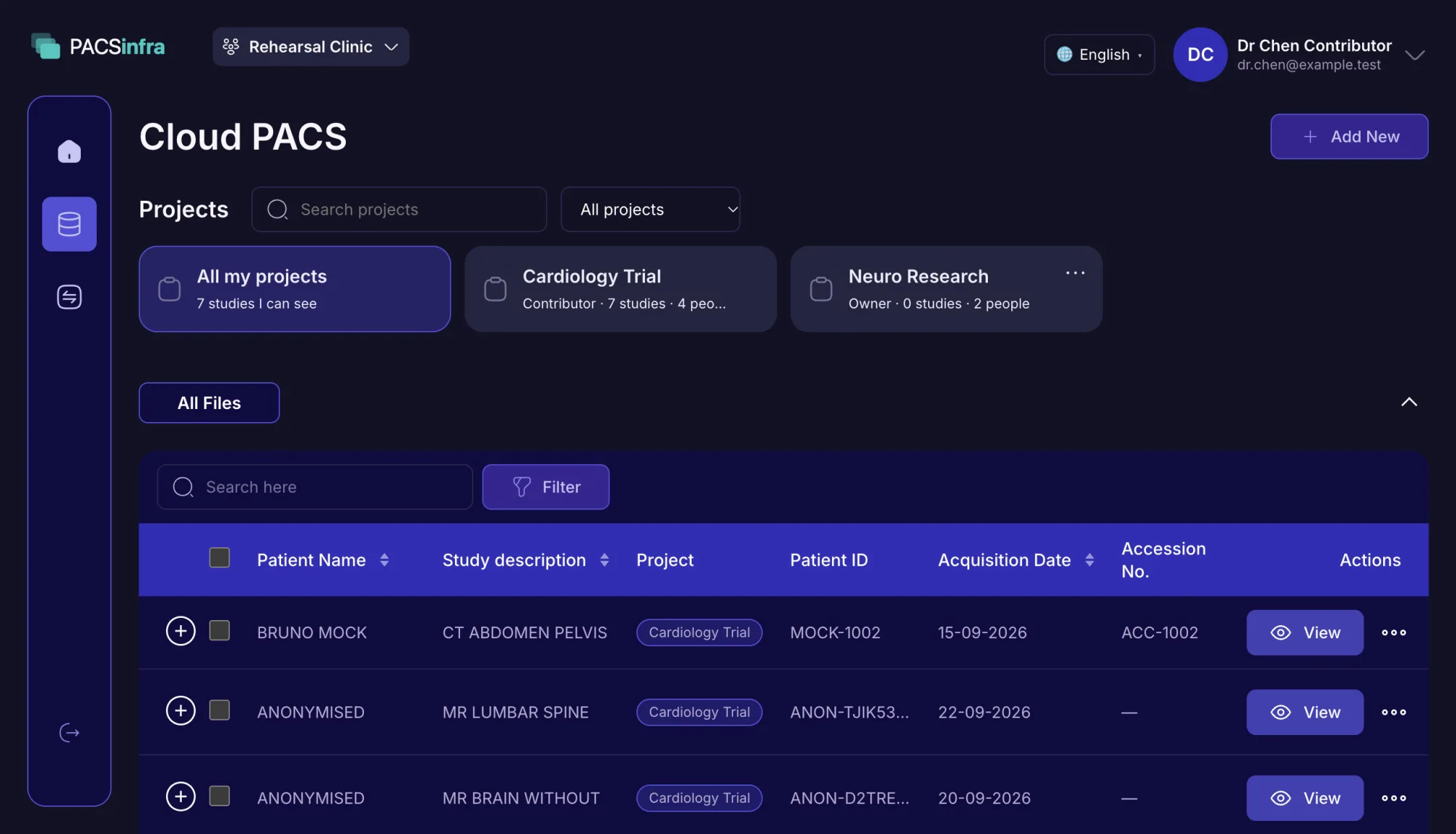
    Studies are shared through projects, where each person is an owner, contributor or reader. Readers can be view-only.

  • Two-factor sign-in

    Sign-in supports two-factor authentication (2FA).

  • DICOM upload and ingest

    Upload single files or ZIP archives, with validation and automatic ingest.

  • DICOM viewer and study browsing

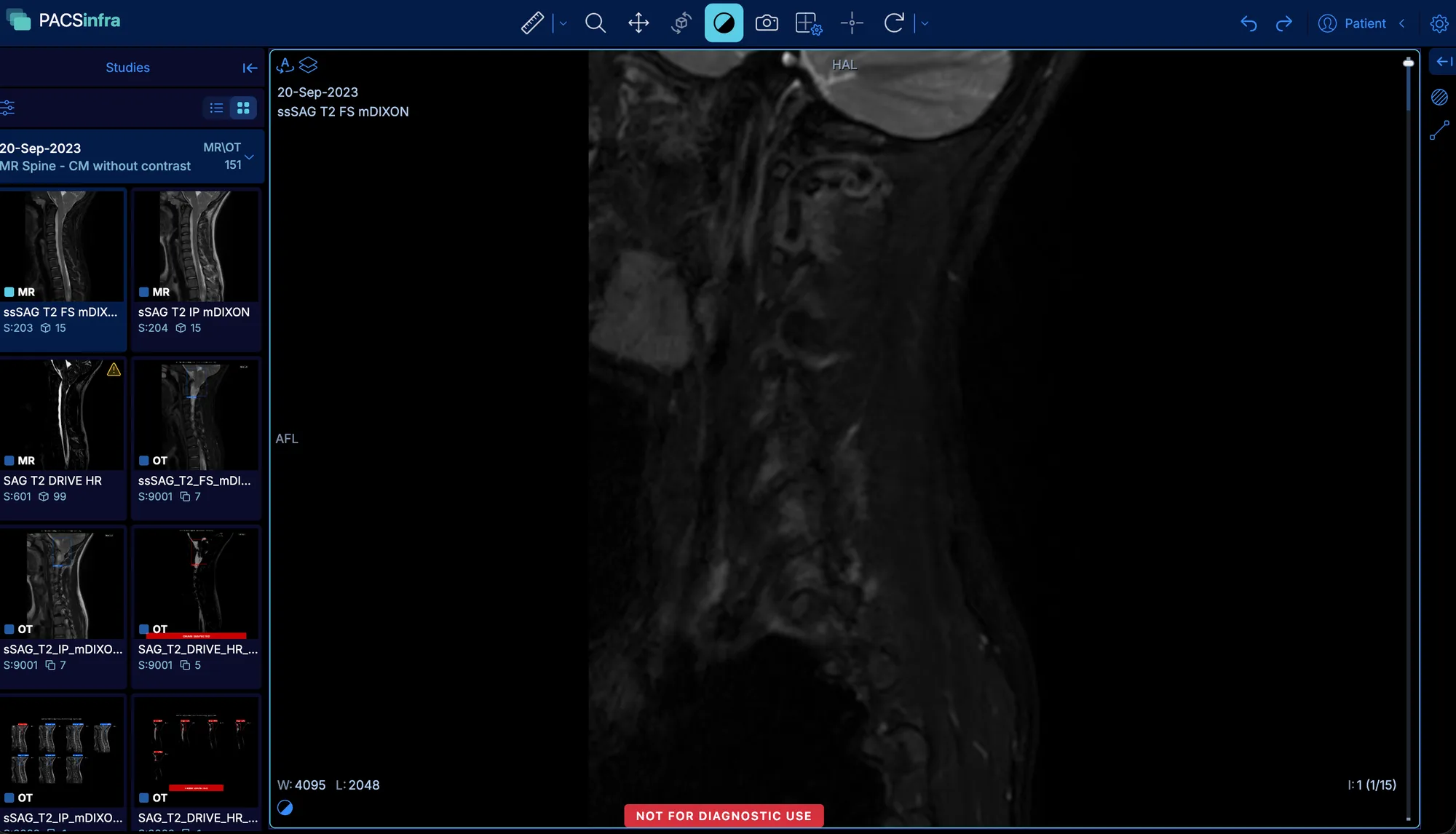
    View every series in the browser with the built-in OHIF viewer. Study lists with search, filters and previews.

  • Radiology reports with voice dictation

    Draft, finalise, version and export reports to PDF. Dictate them by voice, recognised on the doctor’s own computer.

  • Share links with live chat

    Send a study to a patient behind a password, and chat with them in real time on the same link.

  • Break-the-glass access

    Restricted studies can still be opened when needed, but access is always recorded with a reason.

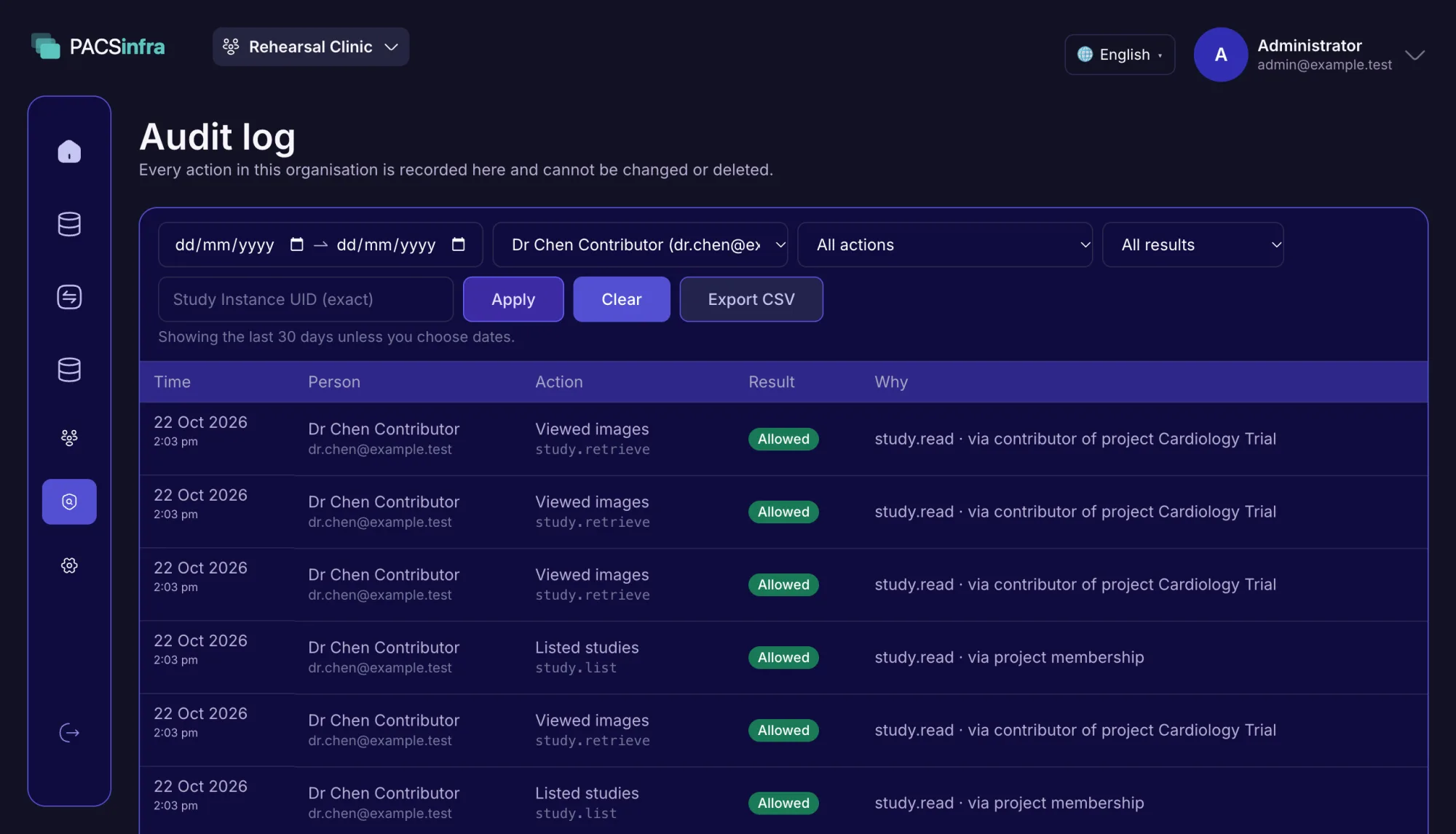
  • Tamper-evident audit trail

    An append-only record of every action, exportable to CSV.

  • DICOM gateway access control

    Each user can query and retrieve only from the DICOM machines an admin has allowed them to use.

  • REST API

    A full REST API with Swagger docs, for developers and integrations.

Architecture

From the scanner to the screen

Studies travel from the hospital to PACSinfra over an encrypted connection, through a DICOM node inside the hospital network or by web upload. Inside PACSinfra, the API checks permissions and records an audit entry before any image reaches a browser or the mobile app. We can set up this whole path for you on our own stack: the PACSinfra server, the DICOM node inside your network, and the encrypted link between them.

Hospital or clinic

Your local network

Modalities

CT · MR · X-ray · ultrasound

Existing PACS / RIS

Optional

DICOM Node

  • Runs inside the hospital network
  • Receives studies from modalities and PACS
  • Sends them over an encrypted network

Or: web upload

DICOM files or ZIP archives from a browser

PACSinfra cloud

Your cloud account or your own server

Gateway

The only public entry point

PACSinfra

  • Sign-in
  • Permissions
  • Audit
  • Reports
  • Image proxy

Private network, no public ports

DICOM worker

Validate · de-identify · ingest

PostgreSQL

App data, audit, job queue

Garage

S3 upload staging

Your team

Anywhere with a login

Web app + Viewer

Study list, viewer, reports, admin

Mobile app

Study list, image previews and reports on the go

Images leave the hospital only over an encrypted connection. Inside PACSinfra, de-identification happens before anything is stored, and every image a user sees is permission-checked and audited.

Capacity and scaling

Built for 50,000+ studies per organisation

PACSinfra sets no limit on the number of studies or the amount of storage. Capacity comes from the server you run it on, and each part of the stack can be scaled on its own.

  • 5,000

    radiologists at once, zero errors

    Each simulated reader opens the worklist, opens a study and loads every image of a series, just as the viewer does. Studies open in under 200 ms (p95).

  • ~600

    images per second, de-identified and searchable

    The full pipeline, end to end: upload, de-identification, storage and indexing. A typical 300-image MR series is ready to read in about 5 seconds.

  • 50,000+

    studies per organisation, pages in ~3 ms

    Tested with 50,000 studies in one organisation: the study list opens in about 3 ms. Every page is an index lookup, never a full scan, so it stays this fast as your archive grows.

Load and ingest figures measured with k6 on a single 5-CPU, 8 GB machine, with the load generator running on the same machine. No cluster, no CDN.

Growing past one server? I have done this before.

I have run PACS and medical imaging infrastructure in production for more than four years, for a university healthcare research group in Australia. As you grow, I can scale your installation with you: more DICOM workers, the database and image storage on their own servers, and more sites connected through DICOM nodes.

Talk to me about scaling

Product

A look inside

The PACSinfra viewer showing a sagittal MR spine series, with series thumbnails on the left and viewing tools along the top

Built-in medical image viewer

Scroll through every series, adjust window and level, measure and compare, right in the browser.

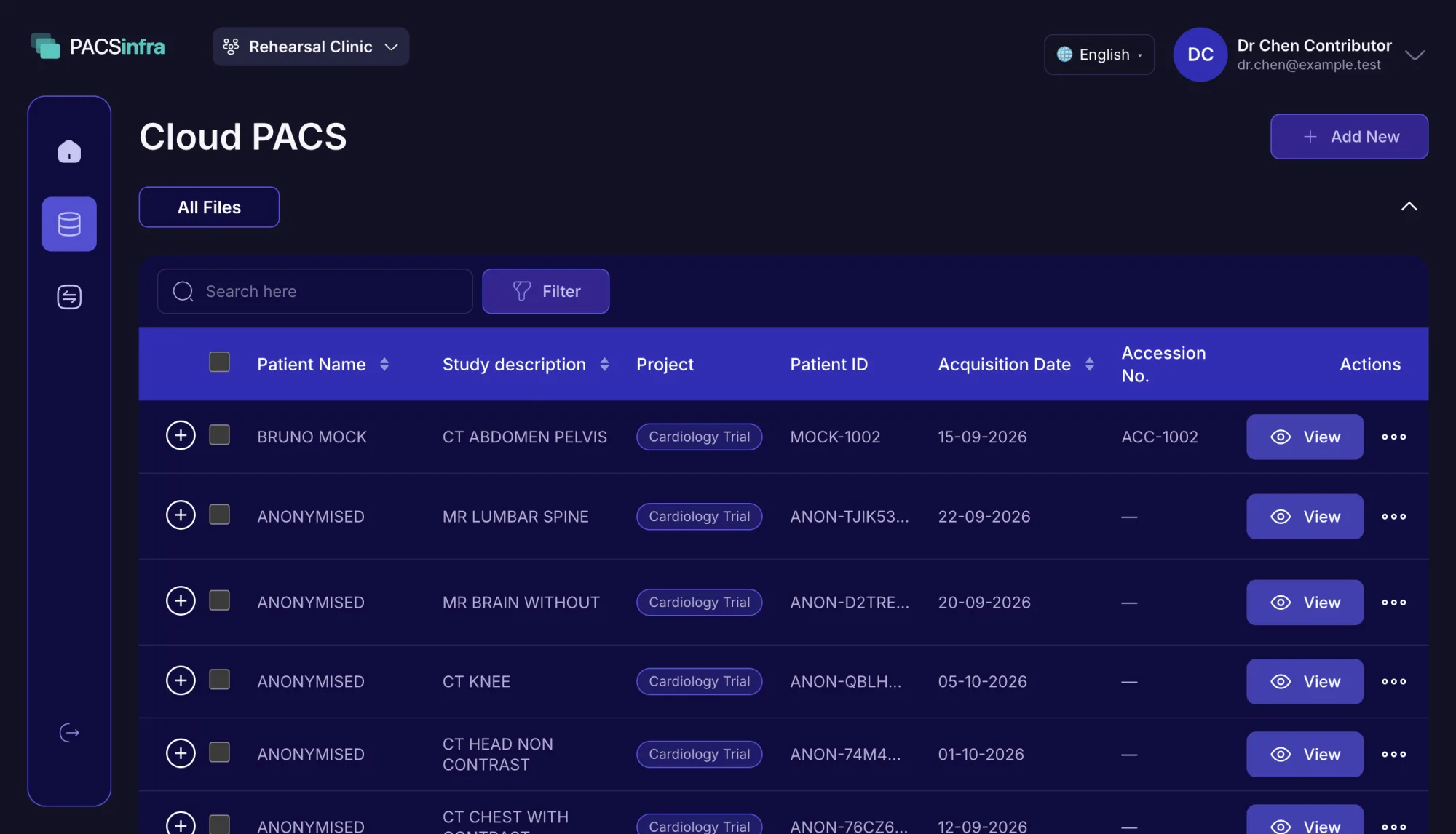
The PACSinfra Cloud PACS study list with patients, study descriptions, project tags, dates and View buttons

Find any study fast

Search and filter every study by patient, date, modality, project or uploader, then open it in one click.

The PACSinfra audit log listing each action with its time, person, result and the permission that allowed it

Every action on record

See who opened which study, when, and under which permission. Entries can never be changed or deleted.

The PACSinfra Cloud PACS page with project cards, each showing the viewer’s role, its study count and its members

Projects decide who sees what

Group studies into projects and add colleagues as owner, contributor or reader. Each card shows how many studies it holds.

The demo is a limited preview. To keep it safe for public sign-ups, each demo company is deleted after 24 hours and holds up to 10 studies (500 MB in total), and some main features, such as the DICOM node and worklist, are not included. Book a call and we will walk you through the full product.

Book a call

Getting started

From first sign-in to first report

How your team starts using PACSinfra once it is set up on your server.

  1. 1

    Sign in as administrator

    Once PACSinfra is set up, you sign in as your organisation’s administrator, with two-factor sign-in.

  2. 2

    Invite your team

    Add colleagues by email. Each one gets a link to sign in, or signs in with Google.

  3. 3

    Create a project

    Group studies the way you work: a clinic, a department, a trial or a reading list.

  4. 4

    Add people with a role

    Choose what each person may do in that project: owner, contributor or reader.

  5. 5

    Upload studies

    Upload DICOM files or ZIP archives into the project, or let the DICOM node send them from your scanners.

  6. 6

    Read, report and share

    Open studies in the viewer, write reports, by voice if you like, and share them with patients.

Three roles in each project

  • Owner

    Manages the project: its people, their roles and which studies it holds. Can do everything a contributor can.

  • Contributor

    Uploads studies, writes and finalises reports, and shares studies with patients.

  • Reader

    Views studies and finalised reports. Can be set to view-only, without downloading files.

Studies are seen only through projects. An administrator manages people, but opens no study unless they are added to its project.

Technology

Built on a fast, modern stack

A lean, modern stack built for speed and safety: a compiled Go 1.27 API, a Python 3.12 imaging engine and PostgreSQL 17.

  • API

    Go 1.27

    One static binary, images streamed with zero buffering

  • DICOM engine

    Python 3.12

    De-identifies in memory, before anything is stored

  • Web app and viewer

    Next.js 16 · React 19 · TypeScript 7

    Bilingual, with the OHIF v3 viewer built in

  • Orthanc 25.6

    A proven DICOM server, used as the image archive

  • PostgreSQL 17

    Application data, the audit trail, the job queue and the image index

  • Garage 1.0

    S3-compatible object storage for upload staging

See the full tech stack →

Pricing

Buy the code once, add setup if you want it

One organisation per licence. You may modify the code. You may not resell or redistribute it.

  • Self-Hosted

    $2,000one-time

    The full source code and a lifetime licence, with every feature and the first year of maintenance free.

    ✓ DICOM viewer, reports, voice dictation, share links and live chat, all for $2,000

    Maintenance (debugging and fixes for any error): free for the first year, then $1,000/year

  • Setup on your server

    +$1,000one-time

    We install and configure PACSinfra on your own server, cloud or Kubernetes cluster, and make sure it runs, so your team can start straight away.

  • Add-on: DICOM node connector and worklist

    +$1,000

    A DICOM node inside your hospital network that receives studies from your modalities and existing PACS and forwards them over an encrypted connection, plus a modality worklist. Set up and connected for you, with its full source code.

What’s included
What’s includedSelf-Hosted$2,000Setup+$1,000Add-on+$1,000
The software
DICOM viewer in the browser––
DICOM upload and ingest––
Radiology reports, exported to PDF––
Voice dictation for reports––
Password-protected share links––
Live chat with patients––
Projects and permissions––
Two-factor sign-in––
Break-the-glass access––
Audit trail with CSV export––
DICOM gateway: each user queries and retrieves only from allowed machines––
REST API with Swagger docs––
The service
Full source code, handed over to your team––
First year of maintenance, debugging and fixes (free)––
Setup on your own server––
Migration of your existing studiesQuoted per project
Connecting your scanners
DICOM node connector––
Modality worklist––
Source code of the DICOM node and worklist––
See what is included and read the pricing FAQ →

About

Who’s behind PACSinfra

Bang Tran

陳業邦

  • Based in Taipei, Taiwan
  • English · 中文 · Tiếng Việt

I’m Bang Tran, the engineer who builds PACSinfra and writes its code. I have more than eight years of experience in the field, working across React, DuckDB, FastAPI and Kubernetes.

For more than four years I built and ran medical imaging and PACS systems in production for a university healthcare research group in Australia. PACSinfra is built on that experience, and on what running those systems every day taught me.

Medical imaging is a field I find genuinely interesting. When you choose PACSinfra, I set it up on your server, hand the full source code over to your team, help move your existing studies in, and look after it. Having run these systems in production, I can help you scale it as your sites, users and study volume grow.
  • 4+ years

    running PACS medical imaging infrastructure in production for a university healthcare research group in Australia

  • 8+ years

    in the software engineering industry

FAQ

Common questions

Where does patient data live?

On your own server. PACSinfra is self-hosted: studies, reports and the audit trail stay on infrastructure you control.

What does de-identification cover?

Patient identifiers are removed from DICOM metadata, including free-text fields and nested sequences, before anything reaches the image archive. De-identification covers DICOM metadata, not text burned into image pixels.

Can clinics still see real patient identities?

Yes. Clinics can keep real identities in a separate application database, apart from the image archive. Research teams can run on pseudonyms only.

How do you know one organisation cannot see another’s studies?

Tenant isolation is verified by an automated isolation test suite, and every image request passes through an API that checks permissions and records an audit entry.

How do studies get from our scanners to PACSinfra?

Through the DICOM Node, which sits inside the hospital network, receives studies from your modalities and existing PACS, and sends them to PACSinfra over an encrypted connection. You can also upload DICOM files or ZIP archives from a browser.

How much data can it hold?

There is no built-in limit on studies or storage. Images live on a disk volume you can grow, and the API and DICOM worker hold no local state, so you can add capacity as you need it.

What do we need to run it?

A single server, in your building or your own cloud. We can set it up on your server for $1,000 and hand the full source code over to your team; moving your existing studies in is quoted separately. I have run PACS in production long enough to help you scale it as your volume grows.

Who can see which studies?

Studies are visible through projects. Each person has a role in each project (owner, contributor or reader), readers can be view-only without download, and emergency access is always recorded with a reason.

How is sign-in protected?

PACSinfra supports two-factor authentication (2FA) at sign-in.

Can we integrate it with our own systems?

Yes. PACSinfra has a full REST API with Swagger docs.

Questions about buying? See the pricing FAQ.

See it on your own data.

Try the demo, compare plans, or talk to us about deploying PACSinfra on your server.